Loading AI BlurWeb
Click to write a Google review!


from 120 reviews
Now powered by AI Detection
Protect sensitive data while
sharing your screen.
AI BlurWeb automatically detects and hides sensitive information like passwords, emails, and credit cards in real-time. Share your work with confidence.


AI Active
Real-time protection
Trusted by 10,000+ people just like you, using on sites like:
 figma.comfigma.com
4.9 out of 5 Rating
10,000+ happy users from Chrome Web Store, Firefox Add-on, Edge Addon and Safari addon
Everything you need to stay private
Built for developers, presenters, and remote workers.
Auto-blur sensitive fields
Automatically detects inputs like passwords and credit card numbers and blurs them instantly.
Blur on screenshot
Seamlessly hides sensitive data when you take a screenshot, even if the fields are visible on screen.
AI-powered detection
Advanced algorithms identify PII (Personally Identifiable Information) across any website.
Local Processing
Data never leaves your browser. All detection and blurring happen locally for maximum security.
Universal Support
Works on all your favorite web apps, from CRMs and Dashboards to Social Media and Email.
Instant Activation
One click to toggle protection. Easy to use, impossible to live without once you try it.
Install AI BlurWeb
Select your browser to add the AI-powered real-time blurring extension.
.svg.png&w=96&q=75)
Chrome Extension
Install from the Chrome Web Store.

Firefox Extension
Install from Firefox Add-ons store.

Edge Extension
Install from Microsoft Edge Add-ons store.
Soon
Safari Extension
Coming soon to the Mac App Store.
Coming Soon
Ready for worry-free
screen sharing?
Join thousands of professionals who protect their sensitive data during screen shares and recordings. No more awkward pauses or risky exposures.
aiblurweb.com
Ai BlurWeb Active
Balance: £45,231.00
Sarah Jenkins
Q3 Marketing Strategy
David Chen
Client pitch d
Sensitive content auto-blurred
Frequently Asked Questions
Everything you need to know about AI BlurWeb and screen privacy.
How does AI BlurWeb detect sensitive information?
AI BlurWeb uses advanced on-device machine learning models to scan your browser viewport in real-time. It identifies patterns like credit card numbers, email addresses, and passwords, applying a secure blur effect before the data can be captured by screen sharing or recording software.
Does my screen data leave my computer?
No. Privacy is our core mission. All AI detection and blurring happen locally within your browser. We never upload your screen data, keystrokes, or any sensitive information to our servers.
Which browsers are supported?
AI BlurWeb is available as a browser extension for Google Chrome, Brave, Microsoft Edge, and other Chromium-based browsers.
Is it compatible with Zoom, Google Meet, and Microsoft Teams?
Yes! Since the blurring happens directly in your browser, any software you use to share your screen or record your browser window (like Zoom, Meet, Teams, or Loom) will only see the blurred version of your sensitive data.
Can I manually blur areas that aren't automatically detected?
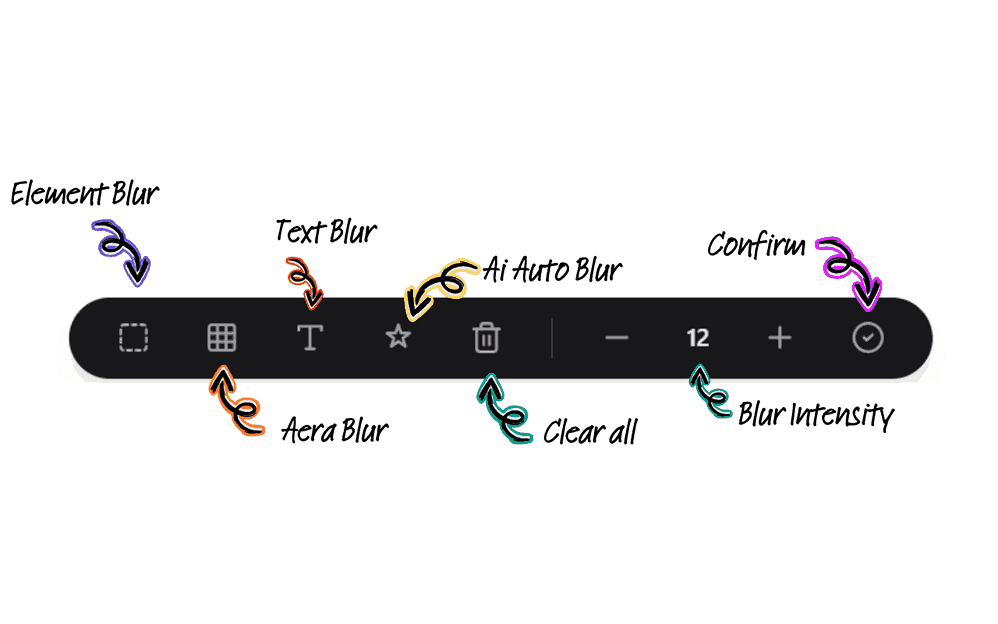
Absolutely. In addition to AI-powered auto-detection, you can manually select any element or area on a webpage to blur instantly using the AI BlurWeb toolbar.
Stop worrying about privacy leaks.
Join thousands of professionals who use AI BlurWeb to present and record with total peace of mind.
Up to 5 Device Licenses
Lifetime Updates